
The decision
Should you choose Vista Social?
Shortlist Vista Social when one platform can replace meaningful scheduling, inbox, reporting, listening, and coordination work. Validate the exact networks and add-on economics before committing.
Best for
Agencies managing multiple client brands; Growing teams replacing separate scheduler, inbox, and reporting tools.
Choose something else if
Solo users needing only simple scheduling; Teams whose critical inbox actions are unsupported or too delayed
Evidence
Editorial research pending · 8.8/10
Pricing checked
From $63.17 · Sep 15, 2026
Free access is available, with limits.
Vista Social advertises a 14-day trial with no credit card, not a permanent free plan. Confirm included features and conversion terms at signup.
We may earn a commission if you subscribe through this link, at no additional cost to you. The relationship does not affect our rating or editorial verdict.
In this guide
- Short answer
- Vista Social at a glance
- What Vista Social does
- Ask Vista, AI writing, and MCP
- Publishing, approvals, and engagement
- Analytics, listening, reviews, and project work
- Vista Social pricing
- Privacy and security questions
- A fair seven-day buyer test
- Pros and cons
- Vista Social alternatives
- Final verdict
Short answer
Vista Social is a strong option for agencies, multi-location organizations, and growing marketing teams that need more than a posting calendar. It combines cross-network publishing, approvals, a unified inbox, reviews, analytics, listening, DM automations, project work, employee advocacy, and the Ask Vista AI assistant.
Its best case is tool consolidation with operational depth. Its risk is paying for breadth your team does not use—or assuming every network supports the same publishing, inbox, and analytics behavior. Vista Social is a qualified recommendation after a channel-specific pilot, not an automatic replacement for strategy, moderation, or native network tools.
Free buyer comparison checklist
Compare this tool before committing.
Use the buyer checklist to compare two tools on the same tasks, including quality, review time and total cost. Get the weekly top 5 AI tools, one practical workflow and one way to reduce AI spending.
Vista Social at a glance
| Question | Answer |
|---|---|
| Best for | Agencies, multi-location brands, and growing social teams |
| Starting price | $79/month; $758/year on annual billing |
| Trial | 14 days, no credit card advertised |
| Main strength | Publishing, engagement, reporting, listening, automation, and project work in one system |
| AI layer | Ask Vista, caption/reply assistance, automations, and MCP connections |
| Main limit | Network capabilities and refresh timing are not uniform |
| Main cost risk | Listening, X, advocacy, extra profiles, and users can raise total spend |
| Review basis | First-party research plus vendor-provided interface artwork; not a long-term paid deployment |
What Vista Social does
Vista Social covers the operating loop around social media: plan campaigns, produce and approve posts, tailor them by network, publish or send reminders, respond to engagement, manage reviews, track results, listen for conversations, automate selected inbox actions, and coordinate work.
Its channel list is broad, including Facebook, Instagram, LinkedIn, TikTok, X, YouTube, Pinterest, Reddit, Threads, Bluesky, Google Business, Snapchat, Tumblr, and review platforms. Capability is not identical across those connections. Some profiles support full publishing, analytics, engagement, and listening; others support only part of that stack or require reminder publishing.
The vendor-provided product image below usefully illustrates the intended consolidation across the calendar, inbox, and analytics. Treat it as interface evidence, not proof of performance; menus, numbers, and capabilities can change.
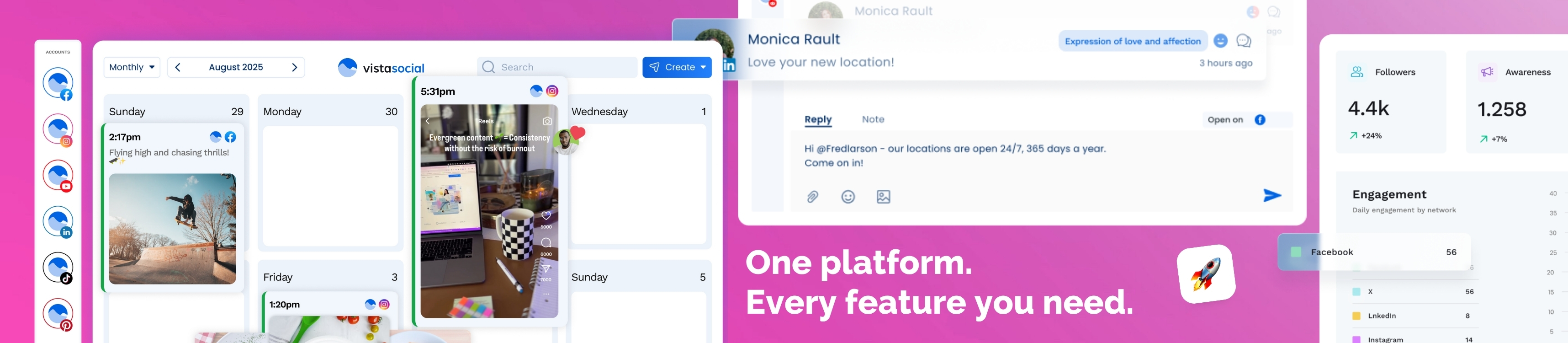
*Vendor-provided affiliate creative, shown unmodified as product evidence. Interface details may change.*
Ask Vista, AI writing, and MCP
Ask Vista is a conversational layer for generating and refining content, assisting with publishing, answering product questions, navigating features, brainstorming, and supporting automation. Vista Social also advertises AI credits for captions and replies, while MCP can connect supported AI clients to Vista Social actions.
This can remove routine clicking and accelerate a first draft. It cannot determine brand truth, legal risk, crisis sensitivity, accessibility, cultural context, or whether a public reply should be automated. Require approval for claims, customer complaints, regulated topics, promotions, and any action with reputational impact.
Publishing, approvals, and engagement
The publishing calendar supports network customization and many native formats, but platform APIs impose real differences. For example, business and creator profiles often support direct publishing where personal profiles or groups may rely on reminders. Test every format you depend on: reels, stories, carousels, first comments, tags, collaboration fields, link behavior, and paid or AI-generated-content labels.
The inbox can centralize comments, mentions, messages, and reviews, yet the coverage table varies by network. Vista Social says Meta and TikTok engagements can load in real time, while several other integrations refresh roughly every five to seven hours. That may be fine for routine community management and too slow for urgent support or crisis monitoring.
Analytics, listening, reviews, and project work
Reports can consolidate results and be scheduled for stakeholders. Social listening on owned profiles is included, while listening across social, web, and news starts at an additional $75/month. Vista Work brings project planning into the same platform, and separate advocacy capabilities can distribute approved content to employees.
Do not evaluate analytics from dashboard polish alone. Compare Vista Social with native network exports for a representative period, document attribution differences, and decide which metrics actually change a business decision. Review-management teams should also test response permissions, location routing, escalation, and whether view-only sources meet their workflow.
Vista Social pricing
Vista Social lists Professional at $79/month or $758/year for 15 profiles and 2 users, Advanced at $149/month or $1,430/year for 30 profiles and 4 users, and Scale at $349/month or $3,638/year for 70 profiles and 8 users. Enterprise is custom. A 14-day trial is advertised. Cross-web listening starts at $75/month, X publishing and analytics costs $29/month, and employee advocacy starts at $199/month for 25 employees. Verify current prices, limits, add-ons, taxes, and trial terms. Verified September 15, 2026.
Annual prices work out to about $63.17, $119.17, and $303.17 per month, but annual contracts reduce flexibility. Build a complete quote around active profiles, users, DM contacts, X, listening, employee advocacy, support, and reporting needs. Then subtract subscriptions and labor the platform would genuinely replace.
Privacy and security questions
Connecting social accounts gives a management platform access to authentication tokens, posts, comments, messages, follower data, and performance metrics. Vista Social's September 2026 privacy policy describes US hosting, account and usage data, connected social content, third-party integrations, retention, and international-transfer mechanisms. It says account information is retained during the account plus 30 days, customer content during the account, and deleted data may remain in backups for up to 90 days.
Vista Social publishes a security center and trust center showing SOC 2 Type II status, plus encryption, access-control, two-factor-authentication, DPA, and enterprise review materials. Buyers should still verify the current report scope, subprocessors, SSO plan, role design, token revocation, audit-log retention, incident notification, exports, deletion, AI-provider data flows, and data-residency requirements.
Use least-privilege roles, require 2FA, audit connected accounts, document offboarding, and keep sensitive personal information out of drafts and prompts. Social messages can contain sensitive details even when nobody intended to collect them.
A fair seven-day buyer test
Run one representative brand or client through Vista Social for seven days. Schedule the same channel mix you use in production, require one approval, handle real inbox items, build a stakeholder report, and test one safe automation. Measure publishing success, manual reminder steps, response freshness, approval time, reporting accuracy, AI correction time, permission fit, and total monthly cost including add-ons.
Include failed tokens, rejected approvals, unsupported post options, duplicate automation triggers, spam, sensitive messages, urgent comments, reporting discrepancies, and an employee leaving the team. Confirm that another operator can understand the queue, pause an automation, revoke access, recover a failed post, and explain every AI-assisted response.
Pros and cons
Pros
- Broad operational surface beyond scheduling
- Strong profile and network coverage for varied teams
- Approvals, permissions, inbox, reporting, listening, and project work can reduce handoffs
- Ask Vista and MCP create useful AI-assisted control paths
- 14-day trial supports a representative pilot
Cons
- Entry price is higher than lightweight schedulers
- X, broader listening, advocacy, and capacity may add cost
- Publishing, inbox, analytics, and refresh behavior vary by network
- AI-generated content and automated replies need human governance
- Migration value depends on replacing tools, not merely duplicating them
Vista Social alternatives
Metricool is a natural comparison for teams prioritizing scheduling, analytics, competitive reporting, and straightforward value. Buffer is attractive for smaller teams that want a simpler publishing and engagement workflow. Hootsuite may fit larger organizations wanting a mature enterprise ecosystem, while Sprout Social is often considered for deeper enterprise social-care and analytics requirements at a higher price.
Choose Vista Social when broad social operations, collaboration, automation, and multi-brand management matter more than the lowest entry price. Choose a lighter alternative when scheduling is the main job, or a specialist when social care, listening, or enterprise governance is the decisive requirement.
Final verdict
Vista Social earns a qualified recommendation for teams that will use its breadth. The platform can centralize a substantial part of social operations, and Ask Vista adds a practical AI layer without changing the fundamental need for human judgment.
Start with one representative brand. Prove publishing reliability, inbox coverage, response freshness, reporting agreement, permission safety, and tool replacement before moving every account.
Affiliate disclosure: DiscoverAI may earn a commission if you subscribe to Vista Social through links in this review, at no additional cost to you. The affiliate relationship did not change the score, evidence standard, limitations, or verdict.
This is a research-based product assessment, not a claim of long-term hands-on use. Product, pricing, AI, privacy, security, and plan claims were checked against first-party sources on September 15, 2026. Verify current plans, limits, integrations, policies, security materials, and terms before buying.
Transparency
How this guide was checked
Editorial accountability
Who checked this guide
- Evaluation type
- Hands-on evaluation
- Last materially checked
- Evidence
- 8 listed sources
Hands-on testing is identified explicitly. Research-based coverage uses cited product documentation and other named sources; it does not imply every paid plan was used. Read the full methodology.
Editorial freshness
Pricing and material product claims were checked September 15, 2026.
Review evidence
What this guidance is based on
- Review type
- Research-based product assessment with vendor-provided interface artwork
- Material review date
- September 15, 2026
- Evidence
- Current first-party pricing, product documentation, privacy, security, terms, and network-support materials
- Affiliate status
- Tracked partner link; editorial score and verdict remain independent
- Buyer test
- Seven-day channel-specific pilot measuring reliability, coverage, freshness, governance, cost, and replaced work
Important limits
- • DiscoverAI did not complete a long-term paid deployment or independently validate uptime, support, AI quality, report accuracy, every network integration, security controls, SOC 2 scope, automation behavior, or high-volume performance.
- • The included platform image is vendor-provided affiliate creative, not an independently captured screenshot; interface details may change.
- • Prices, profile and user limits, add-ons, AI credits, integrations, platform APIs, policies, and terms can change; verify first-party pages and checkout.
Standardized benchmark coverage
How this review maps to the research benchmark
Citation accuracy
Not applicableThe reviewed workflow does not produce source-grounded research answers, so a citation score would be misleading.
Read protocol v2026.10-v1 →Thematic analysis
Not applicableThe reviewed workflow is not qualitative evidence analysis, so a thematic-analysis score would be misleading.
Read protocol v2026.10-v1 →Eligibility is not a product score. DiscoverAI publishes results only after output collection, blinded adjudication, reproducibility checks, and severe-error review.
Open the optional evaluation worksheet
Reusable trial worksheet
Test Vista Social before you commit
Turn this review’s buyer test into evidence. Your entries autosave only in this browser and are never added to shared shortlist links.
Confirm the tool meets every must-have workflow and stakeholder requirement.
Review starting point: Agencies managing multiple client brands; Growing teams replacing separate scheduler, inbox, and reporting tools; Multi-location organizations coordinating reviews and social operations
Run the same representative work you would use in production; do not score a polished demo.
Review starting point: Run a bounded set of representative tasks with known acceptable outcomes, then compare the result with your current workflow.
Calculate the effective cost per accepted result, including usage, review, corrections, and required add-ons.
Review starting point: Vista Social lists Professional at $79/month or $758/year for 15 profiles and 2 users, Advanced at $149/month or $1,430/year for 30 profiles and 4 users, and Scale at $349/month or $3,638/year for 70 profiles and 8 users. Enterprise is custom. A 14-day trial is advertised. Cross-web listening starts at $75/month, X publishing and analytics costs $29/month,…
Define an acceptance threshold, test known answers and edge cases, and record every correction.
Review starting point: Editorial quality signals: features 4.7/5; AI quality 4.1/5. Validate these signals in your own work.
Verify what data enters the product, who can access it, how long it is retained, and whether it trains models.
Review starting point: Use approved low-risk data first. Check roles, consent, deletion, subprocessors, model-training settings, and the contract—not only the marketing page.
Test the real handoffs, permissions, failure states, and export path your team depends on.
Review starting point: Facebook, Instagram, LinkedIn, TikTok, YouTube, Pinterest, Reddit, Threads
Record training, governance, reliability, accessibility, ownership, and change-management risks before rollout.
Review starting point: Listening, X, and employee advocacy can add meaningful cost; Inbox coverage and refresh timing vary by network; AI drafts, replies, reports, and automations still require review
Loading saved worksheet… · private to this device or your optional account
Community evidence
How verified users put Vista Social to work
Structured, editor-moderated experience—not star ratings. This complements our independent review and never changes its score.
No approved community evidence yet. Be the first verified user to contribute.
Community choice
Recommend Vista Social
Loading weekly votes…
One vote per verified account per tool, counted for seven days. Return after your vote expires to support again. Community votes influence homepage trends, never editorial ratings. Voting does not subscribe you to emails.
Sources and references
References cited by this article. Check the original source for scope, dates and current terms.
- Vista Social pricing and plan comparison
- Vista Social supported profiles and network capabilities
- Vista Social engagement support and refresh timing
- Ask Vista getting-started guide
- Vista Social auto-publishing and reminder support
- Vista Social privacy policy
- Vista Social security center
- Vista Social terms of service
Frequently asked questions
What is Vista Social?
Vista Social is a social media management platform for planning, publishing, approvals, engagement, reviews, analytics, listening, automation, project work, and AI-assisted operations across multiple networks.
How much does Vista Social cost?
Vista Social lists Professional at $79/month or $758/year for 15 profiles and 2 users, Advanced at $149/month or $1,430/year for 30 profiles and 4 users, and Scale at $349/month or $3,638/year for 70 profiles and 8 users. Enterprise is custom. A 14-day trial is advertised. Cross-web listening starts at $75/month, X publishing and analytics costs $29/month, and employee advocacy starts at $199/month for 25 employees. Verify current prices, limits, add-ons, taxes, and trial terms. Verified September 15, 2026.
What does Ask Vista do?
Ask Vista is a conversational assistant that can generate or refine social content, help with publishing workflows, answer product questions, assist with navigation, and support automation, brainstorming, and strategy tasks. Its output and proposed actions still need human review.
Is Vista Social secure?
Vista Social publishes a security center, SOC 2 Type II trust-center status, encryption claims, two-factor authentication, a DPA, and enterprise security options. Buyers should verify SSO availability, roles, token access, retention, subprocessors, data location, audit logs, incident terms, and their own social-account permission model.
Recommended tool
Use Vista Social if this workflow fits your team
It offers unusually broad social operations in one workspace, with AI and automation layered onto established team workflows.
We may earn a commission if you subscribe through this link, at no additional cost to you. The relationship does not affect our rating or editorial verdict.
Tools mentioned in this article
Vista Social
Plan, publish, engage, analyze, and automate social media from one workspace
Vista Social is a social media management platform for publishing, approvals, inbox engagement, analytics, listening, reviews, DM automation, project work, and AI-assisted operations.
Metricool
A social media management platform built for scheduling, analytics, reporting, and multi-brand publishing
Metricool combines scheduling, analytics, competitor tracking, link-in-bio tools, reporting, and growing MCP/API automation options in one social media management platform.
Read next
Recommended for you
Top 5 AI Tools for Small Businesses in 2026
A five-tool starter stack that covers writing, design, social media, meetings and automation for without a big monthly bill.
ChatGPT, Canva, Metricool, Fathom and Zapier give a small business one AI tool for each common bottleneck. Every one has a free plan, so you can test before you pay.
Read guide
AI Social Media Tools in 2026: Best Stack for Content, Scheduling, and Analytics
AI Tools for Nonprofits in 2026: Build a Practical Mission-First Stack
Best AI Tools Under $50 a Month for Small Business in 2026