Vista Social Review 2026: Pricing, AI Features, Pros & Cons

Plan, publish, engage, analyze, and automate social media from one workspace

Checked this monthResearch BasedPaidMarketingSocial MediaProductivity
Recently Updated

Who should use this?

Agencies managing multiple client brands and Growing teams replacing separate scheduler, inbox, and reporting tools.

Who should avoid it?

Solo users needing only simple scheduling, Teams whose critical inbox actions are unsupported or too delayed

What problem does it solve?

Centralizes fragmented social publishing, approvals, community engagement, reporting, listening, and workflow coordination.

Would I recommend it?

Shortlist Vista Social when one platform can replace meaningful scheduling, inbox, reporting, listening, and coordination work. Validate the exact networks and add-on economics before committing.

Advisor score

8.8/10

Premium review framework

Visit Vista Social

We may earn a commission if you subscribe through this link, at no additional cost to you. The relationship does not affect our rating or editorial verdict.

Vista Social brings social publishing, engagement, reporting, listening, reviews, automations, team workflows, project management, and AI assistance into one platform.

Direct verdict

Vista Social is worth shortlisting for agencies and growing teams that want more operational depth than a basic scheduler. Its value depends on replacing real tool and reporting work; network-specific gaps, refresh delays, profile limits, and add-ons are the main constraints.

What to verify

Run one representative brand or client through Vista Social for seven days. Schedule the same channel mix you use in production, require one approval, handle real inbox items, build a stakeholder report, and test one safe automation. Measure publishing success, manual reminder steps, response freshness, approval time, reporting accuracy, AI correction time, permission fit, and total monthly cost including add-ons.
Personal Recommendation

Shortlist Vista Social when one platform can replace meaningful scheduling, inbox, reporting, listening, and coordination work. Validate the exact networks and add-on economics before committing.

Try the recommendation

See whether Vista Social belongs in your stack

It offers unusually broad social operations in one workspace, with AI and automation layered onto established team workflows.

We may earn a commission if you subscribe through this link, at no additional cost to you. The relationship does not affect our rating or editorial verdict.

Overall Score

8.8/10
Research Based
Last reviewed
Sep 15, 2026
Last updated
Sep 15, 2026

Editorial Review Framework

How Vista Social scores

Recently Updated

Who should use this?

Agencies managing multiple client brands, Growing teams replacing separate scheduler, inbox, and reporting tools, Multi-location organizations coordinating reviews and social operations.

Who should avoid it?

Solo users needing only simple scheduling, Teams whose critical inbox actions are unsupported or too delayed

What problem does it solve?

Centralizes fragmented social publishing, approvals, community engagement, reporting, listening, and workflow coordination.

Would I recommend it?

Shortlist Vista Social when one platform can replace meaningful scheduling, inbox, reporting, listening, and coordination work. Validate the exact networks and add-on economics before committing.

Overall Score

8.8

Ease of Use

9.0

AI Quality

8.2

Features

9.4

Speed

8.4

Integrations

9.0

Value for Money

8.4

Customer Support

8.6

Learning Curve

8.4

Recommended For

  • Agencies managing multiple client brands
  • Growing teams replacing separate scheduler, inbox, and reporting tools
  • Multi-location organizations coordinating reviews and social operations

Not Recommended For

  • Solo users needing only simple scheduling
  • Teams whose critical inbox actions are unsupported or too delayed
  • Organizations expecting AI to run community engagement without human oversight

Recommended Because…

It offers unusually broad social operations in one workspace, with AI and automation layered onto established team workflows.

Scores use a 0-10 editorial scale. The source data is maintained as 5-point review dimensions, then normalized for reader-friendly comparison.

Reusable trial worksheet

Test Vista Social before you commit

Turn this review’s buyer test into evidence. Your entries autosave only in this browser and are never added to shared shortlist links.

0/7 checks complete
  1. Confirm the tool meets every must-have workflow and stakeholder requirement.

    Review starting point: Agencies managing multiple client brands; Growing teams replacing separate scheduler, inbox, and reporting tools; Multi-location organizations coordinating reviews and social operations

  2. Run the same representative work you would use in production; do not score a polished demo.

    Review starting point: Complete three to five representative tasks with known acceptable outcomes and compare them with your current process.

  3. Calculate the effective cost per accepted result, including usage, review, corrections, and required add-ons.

    Review starting point: Vista Social lists Professional at $79/month or $758/year for 15 profiles and 2 users, Advanced at $149/month or $1,430/year for 30 profiles and 4 users, and Scale at $349/month or $3,638/year for 70 profiles and 8 users. Enterprise is custom. A 14-day trial is advertised. Cross-web listening starts at $75/month, X publishing and analytics costs $29/month,…

  4. Define an acceptance threshold, test known answers and edge cases, and record every correction.

    Review starting point: Editorial quality signals: features 4.7/5; AI quality 4.1/5. Validate these signals in your own work.

  5. Verify what data enters the product, who can access it, how long it is retained, and whether it trains models.

    Review starting point: Use approved low-risk data first. Check roles, consent, deletion, subprocessors, model-training settings, and the contract—not only the marketing page.

  6. Test the real handoffs, permissions, failure states, and export path your team depends on.

    Review starting point: Facebook, Instagram, LinkedIn, TikTok, YouTube, Pinterest, Reddit, Threads

  7. Record training, governance, reliability, accessibility, ownership, and change-management risks before rollout.

    Review starting point: Listening, X, and employee advocacy can add meaningful cost; Inbox coverage and refresh timing vary by network; AI drafts, replies, reports, and automations still require review

Open Decision Workspace

Loading saved worksheet… · private to this device or your optional account

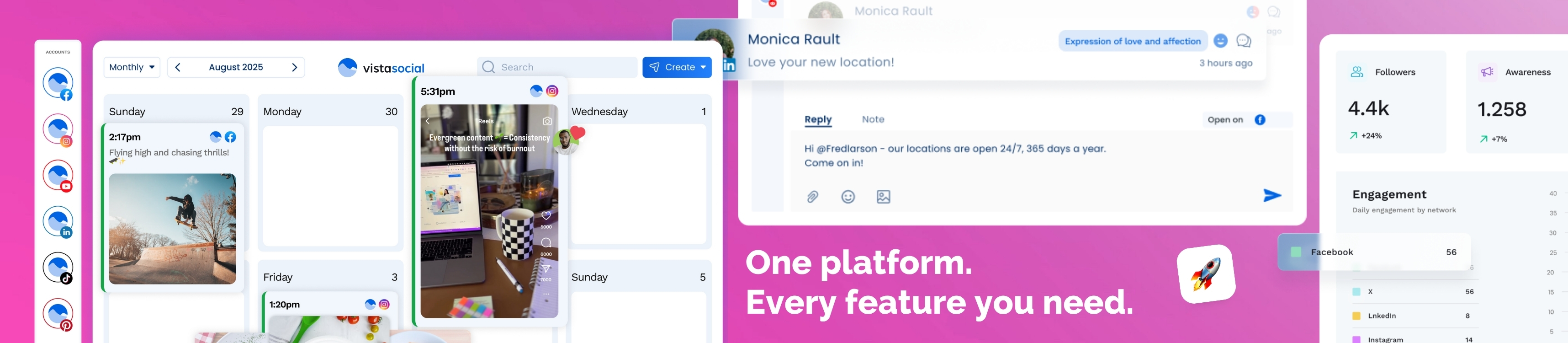
Product interface evidence

Vista Social platform interface showing a publishing calendar, social inbox reply, and analytics dashboard
Vista Social: Interface evidence 1. Vendor-provided Vista Social interface artwork showing publishing, engagement, and analytics surfaces. Interface details may change. Source and usage context.Vendor-provided affiliate creative supplied by the user; shown unmodified as product evidence.

Pricing

Paid

Vista Social lists Professional at $79/month or $758/year for 15 profiles and 2 users, Advanced at $149/month or $1,430/year for 30 profiles and 4 users, and Scale at $349/month or $3,638/year for 70 profiles and 8 users. Enterprise is custom. A 14-day trial is advertised. Cross-web listening starts at $75/month, X publishing and analytics costs $29/month, and employee advocacy starts at $199/month for 25 employees. Verify current prices, limits, add-ons, taxes, and trial terms. Verified September 15, 2026.

Free plan: Vista Social advertises a 14-day trial with no credit card, not a permanent free plan. Confirm included features and conversion terms at signup.

Editorial freshness

Checked this month

Pricing and material product claims were checked September 15, 2026.

Pros & Cons

Pros

  • Broad publishing, engagement, analytics, listening, automation, and project workflow
  • Strong channel breadth with approvals and team permissions
  • Ask Vista and MCP can reduce routine navigation and drafting

Cons

  • Listening, X, and employee advocacy can add meaningful cost
  • Inbox coverage and refresh timing vary by network
  • AI drafts, replies, reports, and automations still require review

Best For

Agencies managing multiple client brandsGrowing teams replacing separate scheduler, inbox, and reporting toolsMulti-location organizations coordinating reviews and social operations

Community evidence

How verified users put Vista Social to work

Structured, editor-moderated experience—not star ratings. This complements our independent review and never changes its score.

No approved community evidence yet. Be the first verified user to contribute.

Key Features

  • Cross-network publishing and calendar
  • Approval workflows and permissions
  • Unified inbox and review management
  • Analytics and scheduled reports
  • Social, web, and news listening
  • DM and inbox automations
  • Vista Work project management
  • Ask Vista AI and MCP
  • Link-in-bio pages
  • Employee advocacy add-on

Integrations

  • Facebook
  • Instagram
  • LinkedIn
  • TikTok
  • YouTube
  • Pinterest
  • Reddit
  • Threads
  • Bluesky
  • Google Business
  • Zapier
  • Make
  • Slack
  • Looker Studio
  • MCP

FAQs

What is Vista Social?

Vista Social is a social media management platform for planning, publishing, approvals, engagement, reviews, analytics, listening, automation, project work, and AI-assisted operations across multiple networks.

How much does Vista Social cost?

Vista Social lists Professional at $79/month or $758/year for 15 profiles and 2 users, Advanced at $149/month or $1,430/year for 30 profiles and 4 users, and Scale at $349/month or $3,638/year for 70 profiles and 8 users. Enterprise is custom. A 14-day trial is advertised. Cross-web listening starts at $75/month, X publishing and analytics costs $29/month, and employee advocacy starts at $199/month for 25 employees. Verify current prices, limits, add-ons, taxes, and trial terms. Verified September 15, 2026.

What does Ask Vista do?

Ask Vista is a conversational assistant that can generate or refine social content, help with publishing workflows, answer product questions, assist with navigation, and support automation, brainstorming, and strategy tasks. Its output and proposed actions still need human review.

Is Vista Social secure?

Vista Social publishes a security center, SOC 2 Type II trust-center status, encryption claims, two-factor authentication, a DPA, and enterprise security options. Buyers should verify SSO availability, roles, token access, retention, subprocessors, data location, audit logs, incident terms, and their own social-account permission model.

Keep Deciding

Where to go next

Material changes only

Follow Vista Social

Get an occasional email when something decision-relevant changes. This is separate from the weekly newsletter.

Alert me about

Confirm by email · unsubscribe from any alert · no newsletter enrollment

Compare alternatives

See how similar tools stack up

Metricool

A social media management platform built for scheduling, analytics, reporting, and multi-brand publishing

4.5

Metricool combines scheduling, analytics, competitor tracking, link-in-bio tools, reporting, and growing MCP/API automation options in one social media management platform.

FreemiumMarketingProductivity